


In today’s dynamic business ecosystem, efficient payment processing and synchronized financial data are critical for competitiveness. Many business professionals, including owners, accountants, bookkeepers, and QuickBooks advisors, face challenges like manual reconciliation, data mismatches, and juggling multiple payment platforms. However, NPSONE offers a powerful solution: seamless integration with QuickBooks. This integration automates payment data synchronization, delivers real-time financial insights, and ensures robust Security and compliance. This article will explain how NPSONE transforms merchant service operations, provides step-by-step setup instructions, and shares best practices for troubleshooting sync issues, ultimately maximizing efficiency for small and medium-sized businesses.
Throughout this article, we will detail NPSONE’s key features, offer clear integration instructions, compare NPSONE with other merchant service providers, and review reporting and analytics tools that drive strategic financial management. Ultimately, by automating the integration process, NPSONE saves time, reduces errors, and improves overall business performance. Moreover, it ensures that sensitive payment data remains secure and compliant with industry standards. Finally, practical troubleshooting techniques and customization tips are provided to further reduce manual workloads and optimize QuickBooks Sync features.
NPSONE QuickBooks Sync changes how payments are handled by linking directly with QuickBooks for smooth data movement. This part shows how NPSONE makes data updates automatic, gives quick financial insights, and has an easy-to-use design for everyone.
Setting up NPSONE with QuickBooks is a simple and user-friendly process. This section gives clear steps for connecting, explains what QuickBooks versions work, and shows how to set up payment options for the best workflow.
NPSONE works with QuickBooks Online, Desktop Pro, Premier, and Enterprise. Its ongoing updates ensure a smooth connection with both cloud-based and installed versions.
On the NPSONE dashboard, go to the payment setup section. Here, you can set things like transaction fees, processing times, and alerts. Options include picking preferred payment methods, checking Money formats, and choosing how often large groups of payments are uploaded. Furthermore, advanced users can change scripts and automation settings for instant payment processing and updates with QuickBooks.
Looking at payment services for QuickBooks users, NPSONE stands out because it connects smoothly, offers full reports, and has strong security. This part compares NPSONE with other providers and explains why it’s a great choice for small and medium-sized businesses.
NPSONE’s main benefit is its all-in-one approach, linking payment processing directly with QuickBooks without needing extra separate tools. Consequently, this leads to automatic balancing of accounts, quick reports, and fewer data entry mistakes compared to many rivals. In addition, its customizable templates and cloud-based updates give faster and more exact insights.
NPSONE handles a wide range of payment types, including:
NPSONE is designed to cater to the specific needs of SMBs by:
Even reliable systems can experience sync issues. This section outlines common errors, their potential causes, and provides clear instructions to resolve payment data mismatches. It also explains when it is appropriate to contact NPSONE support.
Common errors include data mismatches, duplicate entries, and delayed updates. These issues may result from misconfigured mapping settings, temporary network disruptions, or incompatible data formats between NPSONE and QuickBooks. Variations in currency settings or unexpected responses from payment gateways can also lead to discrepancies.
Begin by verifying that the mapping configuration between NPSONE and QuickBooks is correct. Use NPSONE’s reconciliation wizard to diagnose and flag discrepancies automatically. Additionally, manually review sample transactions to ensure alignment. If errors persist, adjust the synchronization frequency to allow more processing time and export detailed logs for further analysis.
If errors continue despite troubleshooting, or if you repeatedly see the same error codes and issues, contact NPSONE support. They can review logs, suggest modifications, and even schedule a live session to ensure your configuration is optimized for accurate data synchronization with QuickBooks.
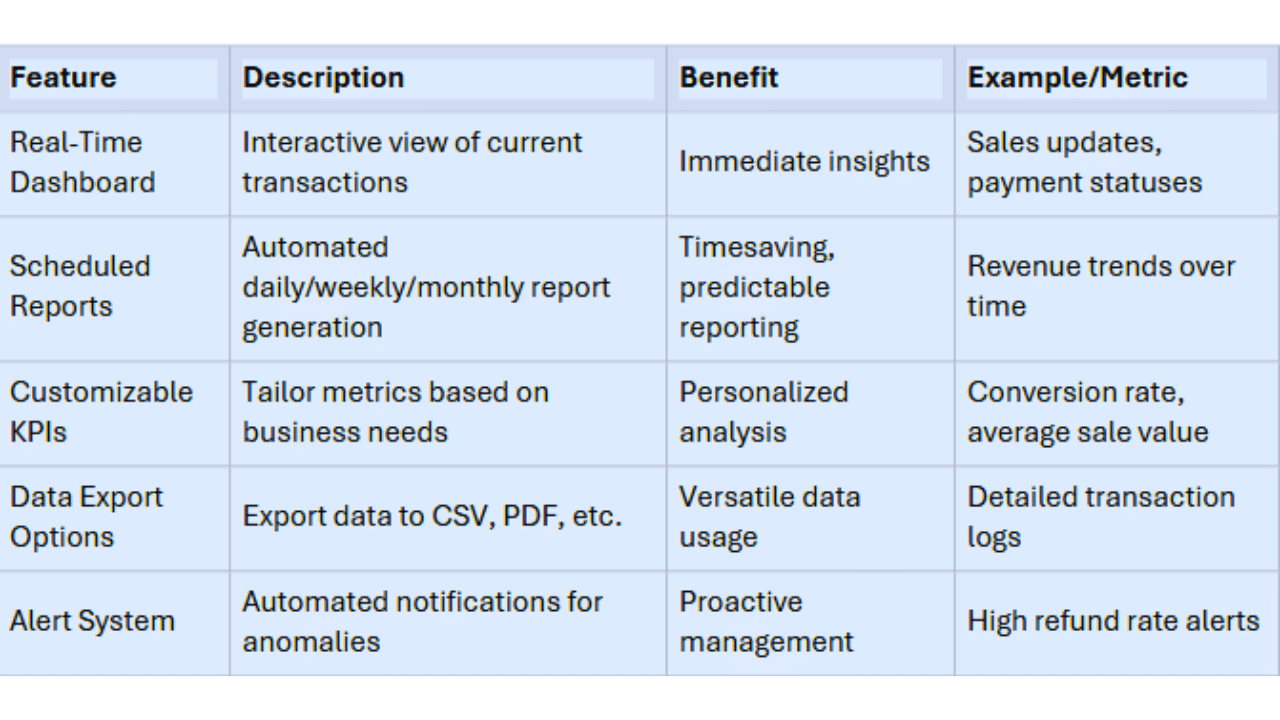
Effective financial management relies on comprehensive reporting and analytics. NPSONE integrates these capabilities directly within QuickBooks, converting payment processing data into actionable insights.
Access sales and payment reports via NPSONE’s dashboard, where pre-configured templates offer daily, weekly, or monthly summaries. These templates break down transaction volumes, payment types, revenue trends, and KPIs. Advanced filters help segment the data, and reports can be exported as CSV or PDF for deeper analysis within QuickBooks.
NPSONE tracks essential financial metrics such as sales growth rate, average transaction value, conversion rates, refund ratios, and customer acquisition costs. Real-time updates and interactive charts help monitor cash flow and budget adherence while alerts signal significant deviations from expected performance.
By synchronizing detailed payment data with QuickBooks, NPSONE transforms raw transaction details into actionable insights. This reduces manual reconciliation, minimizes errors, and shortens financial close processes. Customizable dashboards facilitate proactive decision-making, allowing business owners to optimize operational efficiency and cash flow management.
Below is a summary table outlining NPSONE’s key reporting features:
NPSONE prioritizes security and compliance for QuickBooks payment processing by implementing robust measures throughout the data lifecycle.
This includes:
Industry Compliance: NPSONE adheres to key industry standards, including PCI DSS and GDPR. It maintains compliance through continuous updates, regular audits by external Experts, and adherence to best practices in an evolving regulatory landscape.
Privacy Policies: NPSONE’s privacy policies ensure that personal and financial information is used solely for payment processing and is never shared without consent. Detailed statements clarify data collection, retention, and user rights, fostering trust and adhering to privacy standards.
These features significantly boost processing speed and accuracy.
This includes:
NPSONE offers a transformative solution for integrating merchant services with QuickBooks. By automating synchronization, providing real-time analytics, and upholding rigorous security protocols, NPSONE reduces manual tasks while enhancing data accuracy. The detailed integration instructions and troubleshooting tips empower businesses to optimize workflows, improve financial transparency, and support sustainable business growth.
CLICK HERE TO FIND MORE ABOUT OUR PROGRAMS
integration process generally takes 1 to 2 hours, including account setup, plugin installation, and mapping configuration. With initial testing, the system can go live in a single business day, minimizing operational disruption.
Yes, NPSONE supports a variety of payment methods, including credit/debit cards, ACH transfers, eChecks, and mobile wallet payments to ensure all transactions are accurately processed and synced with QuickBooks.
Review your mapping configurations thoroughly. If mismatches continue, contact NPSONE support for a detailed review of your setup, as they can provide guidance and adjustments to eliminate errors.
Absolutely. NPSONE uses industry-standard encryption, conducts regular security audits, and complies with PCI DSS and GDPR guidelines to ensure that all sensitive data is securely processed and stored.
NPSONE is compatible with various QuickBooks versions, including older releases, though minor adjustments may be necessary. NPSONE’s support team is available to help configure Legacy systems for smooth integration.
The post NPSONE & QuickBooks Integration: Streamline Payments & Sync Data appeared first on Customized Payment Processsing Solutions.